Jedox MCP in practice: what it does, and where I would point it
· Jedox
Jedox AI EPM
I have the Jedox MCP add-on running against a real model. It reads values, writes values, loads values, and turns what it finds into something you can hand to a board in seconds. Here is what works, where I would point it, and where I would be careful.
Short version, before anything else: this is good, and I am more enthusiastic about it than I expected to be.
It reads values. It writes values. It uploads values. Every simple case I have given it has worked, and worked first time. Ask what a rule does and it tells you. Ask for a slice of a cube and it reads the cells. Ask for a dimension and the dimension is there. The harder end, the models with real complexity in them, is what I am working through next, and that is where the genuinely interesting answer will be.
It is worth saying plainly that this is a pre-beta release. Judged at that stage it is not merely promising, it is already useful, and most of what I would change is the sort of thing that gets fixed before general availability. So read what follows as notes from somebody enjoying it, not as a verdict.
What it is, in one picture
It is Claude, running on your own licence, with a licensed connector into your Jedox environment and a layer in between that knows how Jedox artefacts are shaped.
- Claude, on your own licence: Your own AI agreement, not one Jedox resells
- The Jedox connector: A licensed add-on, priced separately from your AI licence
- A set of defined tools: Structure, data, modelling and data loading
- Your Jedox model: Cubes, dimensions, rules, numbers and load jobs
The part people miss is the middle. A general-purpose AI will write you a plausible Jedox rule, and past the simple cases plausible is all it will be. The layer in between knows the shape of real Jedox artefacts and how to put them into a live model, and a good part of what you are paying for is that layer rather than the intelligence on top of it.
What it can reach
Jedox MCP connects to:
- Cubes and databases
- Dimensions and hierarchies
- Calculation rules
- The numbers themselves
- Data load jobs
- Ad hoc analysis views
Behind those sit five groups of tool:
- Reading structure. What exists, how it nests, what is in each dimension.
- Reading data. Slice a cube by period, entity, account, filter and sort it.
- Writing structure. Create cubes, dimensions, hierarchies, elements and rules.
- Writing numbers. Load values into cells in bulk.
- Data loading. Read, change and run Integrator jobs.
In practice a session feels like a conversation with a very fast analyst who can see whatever the account behind it can see, and who knows nothing at all about your company. It will tell you what a rule does in seconds. It will also name a dimension something nobody in your organisation would call it, because nothing has told it otherwise, and closing that gap is the architecture section below.
And this was made in seconds
This is the part I did not expect, and it is the easiest one to undersell in words.
The connector is a Jedox add-on, but the thing on the other end of it is your own Claude licence, with everything Claude can already do. So the session that just read your model does not have to stop at an answer in a chat window. One sentence describing what I wanted produced this, live against the cubes, while I waited:
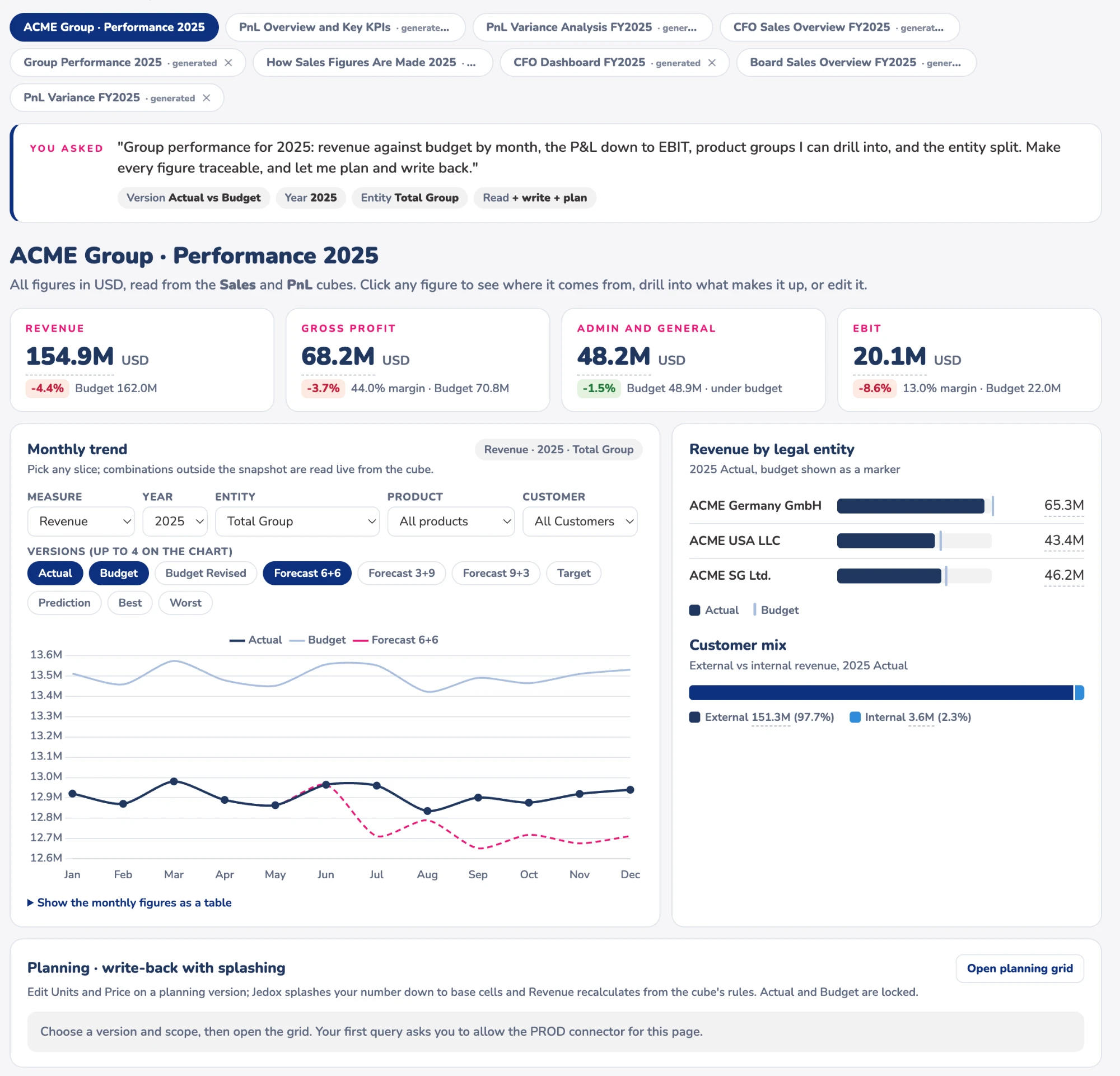
Asked for in a sentence: KPI cards against budget, a monthly trend you can switch versions on, the entity split, the customer mix, and a planning grid that writes back to the cube with splashing. The figures are read from the Sales and PnL cubes, not pasted in.
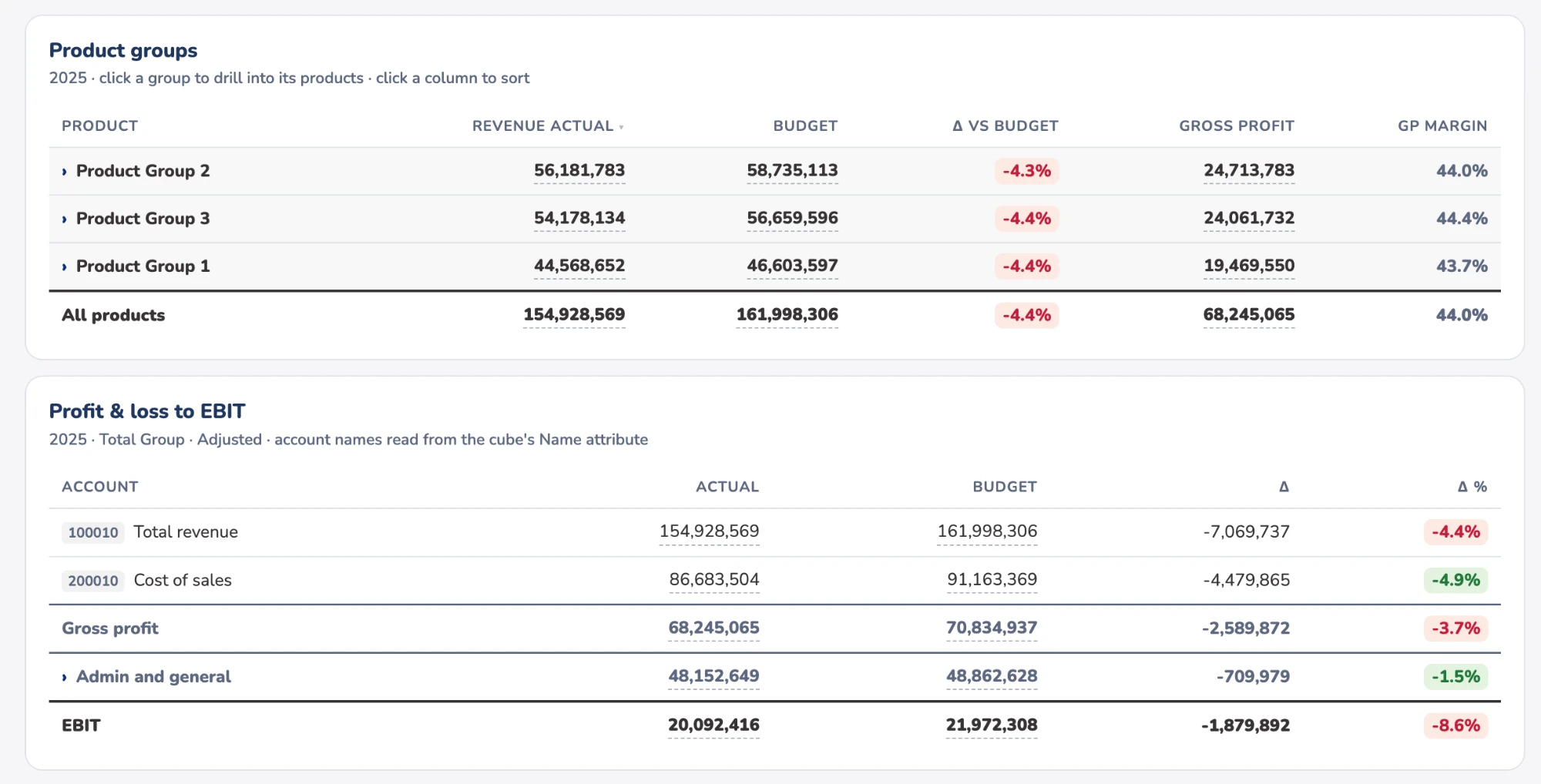
Further down the same page: product groups you can drill into and sort, and the profit and loss down to EBIT, with account names read from the cube's own Name attribute and every figure traceable to where it came from.
That is not a picture of a report. It is a working page, built from the model, in the time it takes to read the request. The same session will just as happily produce a board paper, a slide deck, a documentation set for a model it has just explained to you, or a prototype of a report you are about to ask somebody to build.
None of it is a Jedox artefact. It does not live in Jedox Web, it is not governed by Jedox, and it is not a substitute for a real report. But when what you need by Tuesday is ten slides explaining the variance, the numbers and the tool are in the same window and nothing has to go through Excel on the way.
The one condition is that you know exactly what you want. "Make me a report" gives you something generic. "One page for the board, these four entities, actual against budget by quarter, flag anything over five per cent, in our template" gives you something you can send. It is the same discipline as briefing a new analyst, and the people who are already good at that are immediately good at this.
Where it pays for itself
The expensive part of a planning project has never been the building. It is the rounds of "that is not quite what I meant", and each of those costs a fortnight. Stand up a scoped model, a few dimensions, a cube, the rules that matter, and put it in front of the business in the same week they asked, and you have those conversations while changing things is still cheap.
A prototype is not a solution, and the distance between the two is where a consultant earns their fee. But starting the argument from a model people can poke at beats starting it from a slide, and that is a genuine reduction in project risk rather than a demo effect.
It is also very good at the thing nobody budgets for. Ask it to explain a model nobody documented and it will list every rule on a cube, including the comment whoever wrote it left behind, and tell you what calculates what. If you have inherited a planning model and nobody remembers how the allocation works, that alone will save you a week.
The governance is the right way round
This was the thing I was most prepared to be disappointed by, and it is the thing that pleased me most.
It sees what your user sees. The rights of the account behind a request are the rights the request gets, and Jedox rights go all the way down to the cell. That means the agent is not a new security surface with its own rules to reason about. It is the model you already run, with the answer you already decided.
It is hard to overstate how much easier that makes the conversation with whoever has to approve this. You are not asking them to trust a new permission system. You are asking them to trust the one they already signed off, and to give the agent an account scoped exactly as they would scope a person.
Architecture matters more now, not less
The assumption I keep hearing is that this takes some of the modelling discipline off your hands. From using it, the opposite is true, and it is the point I would most want a client to take away.
The agent understands your model by reading it. Not a specification and not a handover document: the actual dimension names, the actual hierarchy, the comments whoever wrote the rules left behind. That is its entire picture of your business.
So the model is now doing two jobs. It calculates, as it always did, and it is also the context you feed the machine. A model where cost centres are called what the business calls them, where the hierarchy reflects how the company is genuinely run, and where each rule carries a line saying why it exists, gives the agent enough to judge well and to ask you a sensible question when it is unsure. A model full of Dimension_3, Cube_new_final and uncommented rules gives it nothing to work from, so it fills the gap by guessing.
The practical version is unglamorous. Make sure the business-readable name exists somewhere the agent can read it: in most models the elements themselves are source-system keys arriving through Integrator and you cannot rename them without breaking the load, so the readable name belongs in an alias or an attribute, and keeping those populated has stopped being a nicety. Keep hierarchies meaningful rather than convenient. Comment rules with why rather than what. Write your standards down somewhere the agent can be handed them, alongside the chart of accounts and the close calendar.
None of which means you need a tidy model before you start. Reading works on whatever you have, and one of the first things it is good at is telling you what the mess actually contains. But the better the model, the more of the work you can hand over, so all of this has acquired a second return on top of the one it always had.
Where I would point it
This is the split I would give any client, and it is less a warning than a way of getting the most out of it.
On a development or test server, let it build. Dimensions, cubes, rules, load jobs, prototypes, the lot. This is where the speed is worth the most and where being wrong costs nothing. If you are prototyping, this is the only place I would work.
On production, point it at understanding rather than building. And there is a great deal to understand. Where did the variance come from, and which entity and product carried it. What does this rule actually do to the number in the board pack. What happens downstream if a figure moves. If we sell a hundred thousand more units, can the supply chain carry it, and where does it stop being possible.
That last kind of question is the one I find genuinely exciting, because it is the sort of thing a finance team has always wanted and rarely had time for. The model already holds the answer, spread across cubes, hierarchies and rules. What has been missing is somebody with the patience to follow the thread through all of it in an afternoon, and that is exactly what this is good at.
What I would keep an eye on
Nothing here changes the recommendation. These are the things I would know about before switching it on.
It can delete and overwrite, at scale. The same toolset that creates a dimension can remove elements from one, and the same bulk load that fills a cube can write over a large part of it. That is the real reason for the split above, rather than anything subtle. A bad afternoon on a dev server is a restored backup. The same afternoon on production is a conversation.
Writing to a consolidated total spreads it. Write a number to a total and Jedox splashes it down everything beneath. That is normal Jedox behaviour and not a defect, but it is a lot of movement from one confident instruction.
The rule check is a syntax check. There is a tool that validates a rule before you save it and it does catch real mistakes, including an element that does not exist. It accepted a rule reading from a cube that was not there. Syntax-first validation is how the Jedox parser has always worked, so this is not a surprise, but treat the check as a check on the grammar rather than a review of the logic. A rule that cannot resolve what it points at returns nothing rather than announcing itself, and a blank is harder to notice than an error.
A couple of pre-beta edges. Asking one database for its cubes returns the system cubes Jedox keeps behind every dimension along with the real ones, which the tool offers to filter and then does not. And the "top five by value" shortcut rejects any name containing a space, which rules out most real dimension names. Neither stops anything, the general data query works fine, and both are exactly the sort of thing that gets tidied before release.
Dos and don'ts
Do start by reading, not building. Ask it to explain an existing model before you let it create one. It is excellent at that, asking questions cannot damage anything, and you learn how it reasons.
Do give it a dev or test server to build on. Not production with a different name. Somewhere being wrong is free.
Do read every rule it writes, line by line. Look hardest at the target area. A rule that is not scoped tightly enough overwrites aggregated values instead of calculating base cells, and no parser will flag it, because the syntax is perfectly good.
Do fix the naming before you point it at anything. It reads your model to understand it, so tidy structure is not housekeeping any more, it is the quality of the brief.
Do give it your context, not just your request. Naming standards, chart of accounts, house rules. The difference between a briefed setup and a bare one is larger than most people expect.
Do be specific about the output you want. Audience, shape, numbers, template. Vague requests get generic answers from this exactly as they do from people.
Don't let it run data loads on anything that matters. A load is rarely one tidy action. Jobs clear a slice before they write, do full reloads, and chain into other jobs, so one execution can move a great deal more than the cube you had in mind.
Don't give the account more rights than the person would get. The governance is the right way round, so use it. Scope the account exactly as you would scope a user, and the rest follows.
Don't point it at anything you cannot restore. Take a backup first. Obvious, routinely skipped.
Where this lands
An accelerator and a prototyping tool on dev and test, and on production an unusually good way to understand your own numbers. On those terms it is already worth having, at pre-beta, which is not something I say often.
The caveat I would still give is the one I gave before I had it. Building a planning model this way has something in common with vibecoding: excellent at producing something that works quickly from a description, less good at producing something correct in every edge case and maintainable by somebody else in two years. That matters more here than in most software, because the output ends up in a close, and eventually somebody explains a figure to an auditor, which means explaining the rule that calculated it.
So every artefact gets reviewed by somebody who could have written it themselves. That is the whole of the discipline, and with it in place this is a genuinely good product that is only going to get better.